

Why Your Connection Type Matters More Than You Might Think
When most people think about home internet performance, they focus on the speed tier they pay for each month. But the physical technology delivering that connection to your home - the actual medium carrying data between your house and the provider's network - shapes what speeds are even achievable, how stable the signal is, and how the connection behaves under pressure.
Understanding the four dominant connection types helps you evaluate what you currently have, weigh options when moving, and diagnose problems when things go wrong. For a deeper look at what speed figures actually mean once you have a connection, see what internet speed numbers actually mean.
The Four Main Home Internet Technologies Compared
Each technology uses a different physical medium and transmission method, which directly determines its performance characteristics.
| Cable | Fiber | DSL | Satellite | |
|---|---|---|---|---|
| Typical download speed | 25-1,000 Mbps | 100 Mbps-5+ Gbps | 1-100 Mbps | 25-200 Mbps |
| Typical upload speed | 5-50 Mbps | Equal to download | 1-20 Mbps | 3-20 Mbps |
| Latency (typical) | 10-40 ms | 5-20 ms | 20-80 ms | 20-600 ms |
| Physical medium | Coaxial cable | Glass/plastic fiber strands | Copper phone lines | Radio signals to orbit |
| Weather sensitivity | Low | Very low | Low | Moderate to high |
| Urban/suburban availability | Very wide | Growing | Moderate | Everywhere |
| Rural availability | Limited | Limited | Moderate | Everywhere |
| Peak-hour congestion risk | Moderate | Low | Low | Moderate |
These figures represent typical real-world ranges, not advertised maximums. Actual performance varies by provider, infrastructure age, and local congestion.
Cable: The Most Common Broadband Option
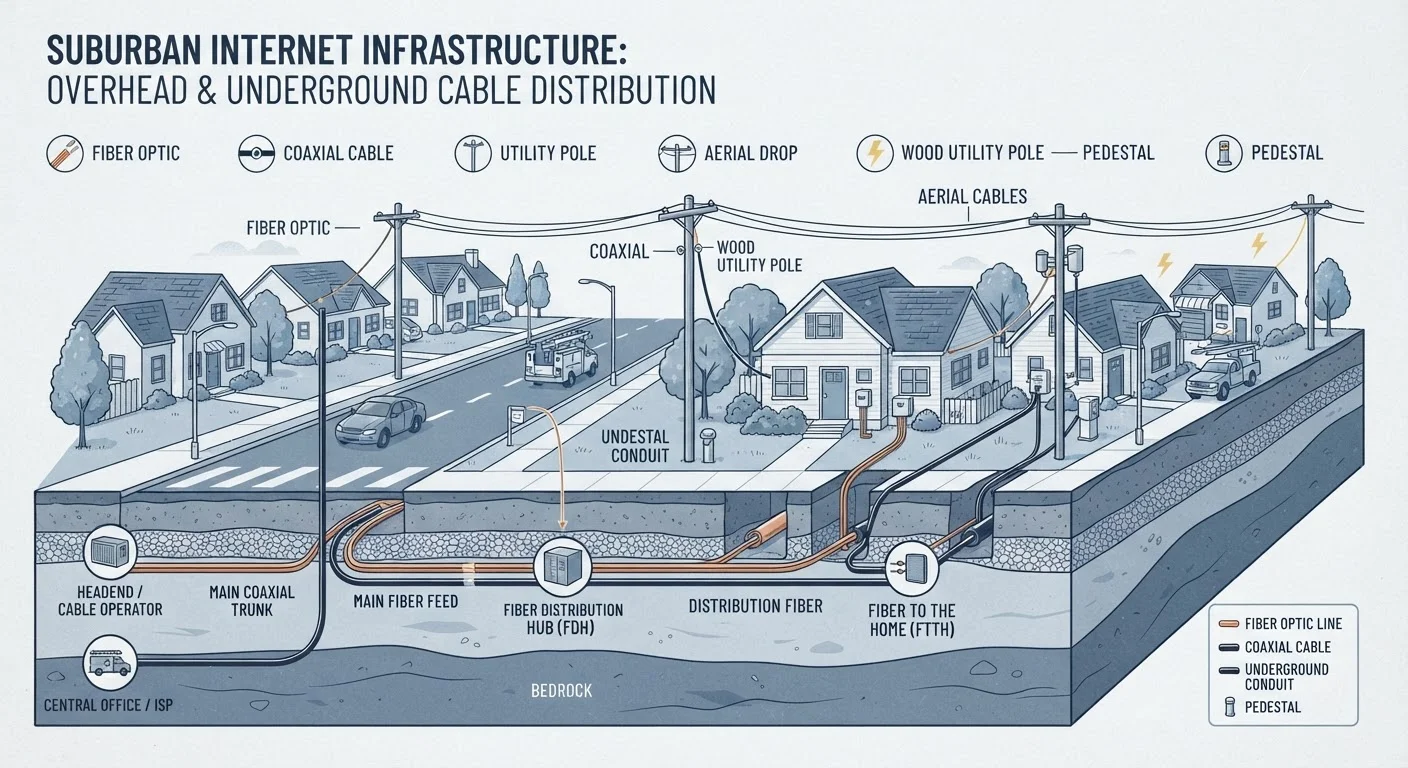
Cable internet travels over the same coaxial cable lines originally built for television. It is the most widely deployed broadband technology in the United States, covering the majority of urban and suburban households.
Cable delivers download speeds that comfortably support streaming, video calls, and multiple simultaneous users. The primary limitation is a shared network architecture - in many deployments, neighbors in the same area share bandwidth on the same line segment. This can cause noticeable slowdowns during evening peak hours when demand is highest.
Upload speeds on cable have historically lagged well behind download speeds, which matters more now that video conferencing and cloud backups are everyday activities. Newer cable standards, specifically DOCSIS 3.1 and the emerging DOCSIS 4.0, are designed to improve upload capacity significantly.
Check Your Connection Type Before Troubleshooting
If your internet feels slower than expected, knowing whether you have cable, fiber, DSL, or satellite changes where you look first. Cable users should check for peak-hour patterns; DSL users should consider distance to the central office. Running a speed test at different times of day can reveal a pattern. See our guide to reading a Wi-Fi speed test for help interpreting the results.
Fiber: The Performance Standard
Fiber optic internet transmits data as pulses of light through thin glass or plastic strands. Because light signals do not degrade the way electrical signals do over long distances, fiber can sustain very high speeds with minimal signal loss.
The most important differentiator is symmetrical speeds - fiber plans typically offer upload speeds that match download speeds. This matters for anyone uploading large files, running video calls, or gaming. Fiber also delivers the lowest latency of any wired connection type, meaning data travels to its destination and back faster.
The significant limitation is availability. Fiber requires purpose-built infrastructure, and deployment is expensive. Many communities - particularly smaller towns and rural areas - have not yet had fiber networks built out to them. If your address has fiber service available, it is generally the highest-performing option for home use.
DSL: Reaching Homes Through Phone Lines
Digital Subscriber Line (DSL) transmits internet data over the copper phone lines that already connect most US homes to the telephone network. Because that infrastructure is already in place, DSL often reaches addresses that cable has never been extended to.
DSL speeds are meaningfully lower than cable or fiber, and performance degrades the farther a home is from the provider's central switching facility (called a central office). Homes close to a central office may get usable speeds for everyday browsing and standard-definition streaming; homes several miles away may experience considerably slower connections.
For households where DSL is the only wired option, it provides a more stable and lower-latency experience than satellite, even if raw speeds are modest. Understanding what those modest speed numbers actually let you do is covered in our guide to internet speed numbers.
Satellite: Coverage Where Nothing Else Reaches
Satellite internet bypasses ground-based infrastructure entirely by transmitting data between a dish at the user's home and an orbiting satellite. This makes it the only broadband option for homes in remote areas beyond the reach of cable, fiber, or DSL networks.
The fundamental physics of satellite create a latency challenge. Traditional geostationary satellites orbit roughly 22,000 miles above Earth. At that distance, data must travel tens of thousands of miles twice for each round trip, producing latency figures that make real-time gaming and live video calls noticeably sluggish. Newer low-Earth orbit (LEO) satellite networks operate at a fraction of that altitude, substantially reducing latency, though they remain more expensive than ground-based options and capacity varies by coverage area.
Weather can also affect satellite signal quality, particularly during heavy rain or dense cloud cover. For rural households with no wired alternative, satellite service has improved meaningfully in recent years, but users should approach it with realistic expectations about latency and cost.
Once you know which connection type serves your home, the next step is understanding how your router and home network distribute that signal - our guide to home Wi-Fi from the ground up covers the hardware side clearly. And if your connection seems slower than it should be, things that quietly slow down your home internet identifies the most common culprits.


